
NPC Shops and Trading
Goal
Create a Feran Longtooth Merchant — a passive NPC that offers barter trades, exchanging Enchanted Fruit for Enchanted Saplings and Crystal Glow blocks. You will build the shop definition, set up the NPC role with interaction logic, and connect everything so players can right-click the NPC to trade.
What You’ll Learn
- How barter shop definitions control NPC trading inventories
- How
Fixedtrade slots offer always-available trades - How
Pooltrade slots create rotating random stock - How
InteractionInstructionwithOpenBarterShopconnects the shop to an NPC - How
Stock,RefreshInterval, andRestockHourmanage inventory resets
Prerequisites
- A working mod environment (see Setup Your Dev Environment)
- The Enchanted Tree mod installed (see Custom Trees and Saplings) — provides
Plant_Fruit_EnchantedandPlant_Sapling_Enchanted - The Slime NPC with loot table (see Custom Loot Tables) — the Slime drops Enchanted Fruit
Companion mod repository: hytale-mods-custom-shop
Barter Shop Overview
Barter shops live in Server/BarterShops/ and define what an NPC merchant sells. Hytale uses a barter system — players trade items directly for other items, there is no currency.
Each trade has an Input (what the player pays) and an Output (what the player receives). The vanilla game includes two merchants:
- Kweebec Merchant — 3 fixed trades + 2 pool groups with rotating stock, restocks every 3 days
- Klops Merchant — 1 fixed trade, restocks daily
Step 1: Set Up the Mod File Structure
NPCShopsAndTrading/├── manifest.json├── Server/│ ├── BarterShops/│ │ └── Feran_Enchanted_Merchant.json│ ├── NPC/│ │ └── Roles/│ │ └── Feran_Enchanted_Merchant.json│ └── Languages/│ ├── en-US/│ │ └── server.lang│ ├── es/│ │ └── server.lang│ └── pt-BR/│ └── server.langmanifest.json
{ "Group": "HytaleModdingManual", "Name": "NPCShopsAndTrading", "Version": "1.0.0", "Description": "Feran Longtooth merchant that trades Enchanted Fruit for Enchanted Saplings", "Authors": [ { "Name": "HytaleModdingManual" } ], "Dependencies": {}, "OptionalDependencies": {}, "IncludesAssetPack": false, "TargetServerVersion": "2026.02.19-1a311a592"}Note that IncludesAssetPack is false — this mod only adds server-side JSON files. The Feran Longtooth model already exists in vanilla, so we don’t need a Common/ folder.
Step 2: Create the Barter Shop Definition
The shop definition controls what trades appear in the UI when the player interacts with the merchant.
Create Server/BarterShops/Feran_Enchanted_Merchant.json:
{ "DisplayNameKey": "server.barter.feran_enchanted_merchant.title", "RefreshInterval": { "Days": 2 }, "RestockHour": 6, "TradeSlots": [ { "Type": "Fixed", "Trade": { "Output": { "ItemId": "Plant_Sapling_Enchanted", "Quantity": 1 }, "Input": [{ "ItemId": "Plant_Fruit_Enchanted", "Quantity": 3 }], "Stock": 5 } }, { "Type": "Fixed", "Trade": { "Output": { "ItemId": "Ore_Crystal_Glow", "Quantity": 1 }, "Input": [{ "ItemId": "Plant_Fruit_Enchanted", "Quantity": 10 }], "Stock": 3 } } ]}Shop Fields
| Field | Purpose |
|---|---|
DisplayNameKey | Translation key for the shop title shown in the trading UI |
RefreshInterval.Days | Number of in-game days between stock refreshes |
RestockHour | Hour of day (0-24) when the restock happens. 6 = 6 AM |
TradeSlots | Array of trade slot definitions (Fixed or Pool) |
This shop has two fixed trades:
| Trade | Input | Output | Stock |
|---|---|---|---|
| Sapling | 3 Enchanted Fruit | 1 Enchanted Sapling | 5 per restock |
| Crystal | 10 Enchanted Fruit | 1 Crystal Glow block | 3 per restock |
The Crystal Glow block is more expensive (10 fruit vs 3) and has lower stock, making it a premium trade.
Step 3: Understanding Trade Slot Types
Fixed Slots
Fixed slots always appear in the shop and offer the same trade:
{ "Type": "Fixed", "Trade": { "Output": { "ItemId": "Plant_Sapling_Enchanted", "Quantity": 1 }, "Input": [{ "ItemId": "Plant_Fruit_Enchanted", "Quantity": 3 }], "Stock": 5 }}| Field | Purpose |
|---|---|
Trade.Output | The item and quantity the player receives |
Trade.Input | Array of items the player must pay. Multiple entries require all items |
Trade.Stock | Number of times this trade can be completed before restocking |
Pool Slots
Pool slots randomly select trades from a larger pool on each restock, creating rotating stock. The vanilla Kweebec_Merchant uses this pattern:
{ "Type": "Pool", "SlotCount": 3, "Trades": [ { "Weight": 50, "Output": { "ItemId": "Food_Salad_Fruit", "Quantity": 2 }, "Input": [{ "ItemId": "Ingredient_Life_Essence", "Quantity": 20 }], "Stock": [4, 8] }, { "Weight": 20, "Output": { "ItemId": "Recipe_Food_Pie_Apple", "Quantity": 1 }, "Input": [{ "ItemId": "Ingredient_Life_Essence_Concentrated", "Quantity": 2 }], "Stock": [1] } ]}| Field | Purpose |
|---|---|
SlotCount | Number of trades randomly selected from the pool each restock |
Trades[].Weight | Relative probability of this trade appearing. Higher = more likely |
Trades[].Stock | Array format: [fixed] for exact stock or [min, max] for random range |
The difference from fixed slots: pool Stock uses an array ([4, 8] means 4-8 units), while fixed Stock uses a number (5 means exactly 5).
Step 4: Create the Merchant NPC Role
This is the most important step. Vanilla merchants use a Type: "Generic" NPC with InteractionInstruction that opens the barter shop when a player right-clicks. This is very different from combat NPCs that use Variant + Reference.
Create Server/NPC/Roles/Feran_Enchanted_Merchant.json:
{ "Type": "Generic", "Parameters": { "NameTranslationKey": { "Value": "server.npcRoles.Feran_Enchanted_Merchant.name", "Description": "Translation key for NPC name display" } }, "StartState": "Idle", "DefaultNPCAttitude": "Ignore", "DefaultPlayerAttitude": "Neutral", "Appearance": "Feran_Longtooth", "MaxHealth": 100, "KnockbackScale": 0.5, "IsMemory": true, "MemoriesCategory": "Feran", "BusyStates": ["$Interaction"], "MotionControllerList": [ { "Type": "Walk", "MaxWalkSpeed": 3, "Gravity": 10, "RunThreshold": 0.3, "MaxFallSpeed": 15, "MaxRotationSpeed": 360, "Acceleration": 10 } ], "Instructions": [ { "Instructions": [ { "$Comment": "Idle state - no player nearby", "Sensor": { "Type": "State", "State": "Idle" }, "Instructions": [ { "$Comment": "Watch player when they approach", "Sensor": { "Type": "Player", "Range": 8 }, "Actions": [ { "Type": "State", "State": "Watching" } ] }, { "Sensor": { "Type": "Any" }, "BodyMotion": { "Type": "Nothing" } } ] }, { "$Comment": "Watching state - player is nearby", "Sensor": { "Type": "State", "State": "Watching" }, "Instructions": [ { "Continue": true, "Sensor": { "Type": "Player", "Range": 12 }, "HeadMotion": { "Type": "Watch" } }, { "$Comment": "Return to Idle when player leaves", "Sensor": { "Type": "Not", "Sensor": { "Type": "Player", "Range": 12 } }, "Actions": [ { "Type": "State", "State": "Idle" } ] }, { "Sensor": { "Type": "Any" }, "BodyMotion": { "Type": "Nothing" } } ] }, { "$Comment": "Interaction state - look at player while shop is open", "Sensor": { "Type": "State", "State": "$Interaction" }, "Instructions": [ { "Continue": true, "Sensor": { "Type": "Target", "Range": 10 }, "HeadMotion": { "Type": "Watch" } }, { "Sensor": { "Type": "Any" }, "Actions": [ { "Type": "Timeout", "Delay": [1, 1], "Action": { "Type": "Sequence", "Actions": [ { "Type": "ReleaseTarget" }, { "Type": "State", "State": "Watching" } ] } } ] } ] } ] } ], "InteractionInstruction": { "Instructions": [ { "Sensor": { "Type": "Not", "Sensor": { "Type": "CanInteract", "ViewSector": 180 } }, "Actions": [ { "Type": "SetInteractable", "Interactable": false } ] }, { "Continue": true, "Sensor": { "Type": "Any" }, "Actions": [ { "Type": "SetInteractable", "Interactable": true, "Hint": "server.interactionHints.trade" } ] }, { "Sensor": { "Type": "HasInteracted" }, "Instructions": [ { "Sensor": { "Type": "Not", "Sensor": { "Type": "State", "State": "$Interaction" } }, "Actions": [ { "Type": "LockOnInteractionTarget" }, { "Type": "OpenBarterShop", "Shop": "Feran_Enchanted_Merchant" }, { "Type": "State", "State": "$Interaction" } ] } ] } ] }, "NameTranslationKey": { "Compute": "NameTranslationKey" }}How the Merchant NPC Works
This is a Type: "Generic" NPC — unlike combat NPCs that inherit from templates, merchants define their behavior directly. Here’s what each section does:
| Section | Purpose |
|---|---|
DefaultPlayerAttitude: "Neutral" | The NPC won’t attack players |
BusyStates: ["$Interaction"] | Prevents the NPC from doing other things while the shop is open |
Instructions | AI behavior: idle, watch approaching players, look at player during trade |
InteractionInstruction | Right-click logic: show trade hint, open shop when clicked |
The critical part is the InteractionInstruction:
SetInteractablewithHint: "server.interactionHints.trade"— shows the “Trade” tooltip when the player looks at the NPCHasInteractedsensor — triggers when the player right-clicksOpenBarterShopwithShop: "Feran_Enchanted_Merchant"— opens the trading UI linked to the shop definitionLockOnInteractionTarget— makes the NPC face the player during the trade
Step 5: Add Translation Keys
Create a server.lang file for each language:
Server/Languages/en-US/server.lang
npcRoles.Feran_Enchanted_Merchant.name = Enchanted Merchantbarter.feran_enchanted_merchant.title = Enchanted MerchantinteractionHints.trade = TradeServer/Languages/es/server.lang
npcRoles.Feran_Enchanted_Merchant.name = Mercader Encantadobarter.feran_enchanted_merchant.title = Mercader EncantadointeractionHints.trade = ComerciarServer/Languages/pt-BR/server.lang
npcRoles.Feran_Enchanted_Merchant.name = Mercador Encantadobarter.feran_enchanted_merchant.title = Mercador EncantadointeractionHints.trade = NegociarThe .lang keys omit the server. prefix — the engine adds it automatically for server-side language files.
Step 6: Test In-Game
-
Copy the
NPCShopsAndTrading/folder to%APPDATA%/Hytale/UserData/Mods/ -
Make sure the CustomTreesAndSaplings mod is also installed — the shop references items from it
-
Launch Hytale and enter Creative Mode
-
Spawn the merchant and get some Enchanted Fruit to trade:
/op self/npc spawn Feran_Enchanted_Merchant/spawnitem Plant_Fruit_Enchanted 9 -
Right-click the Feran to open the barter shop
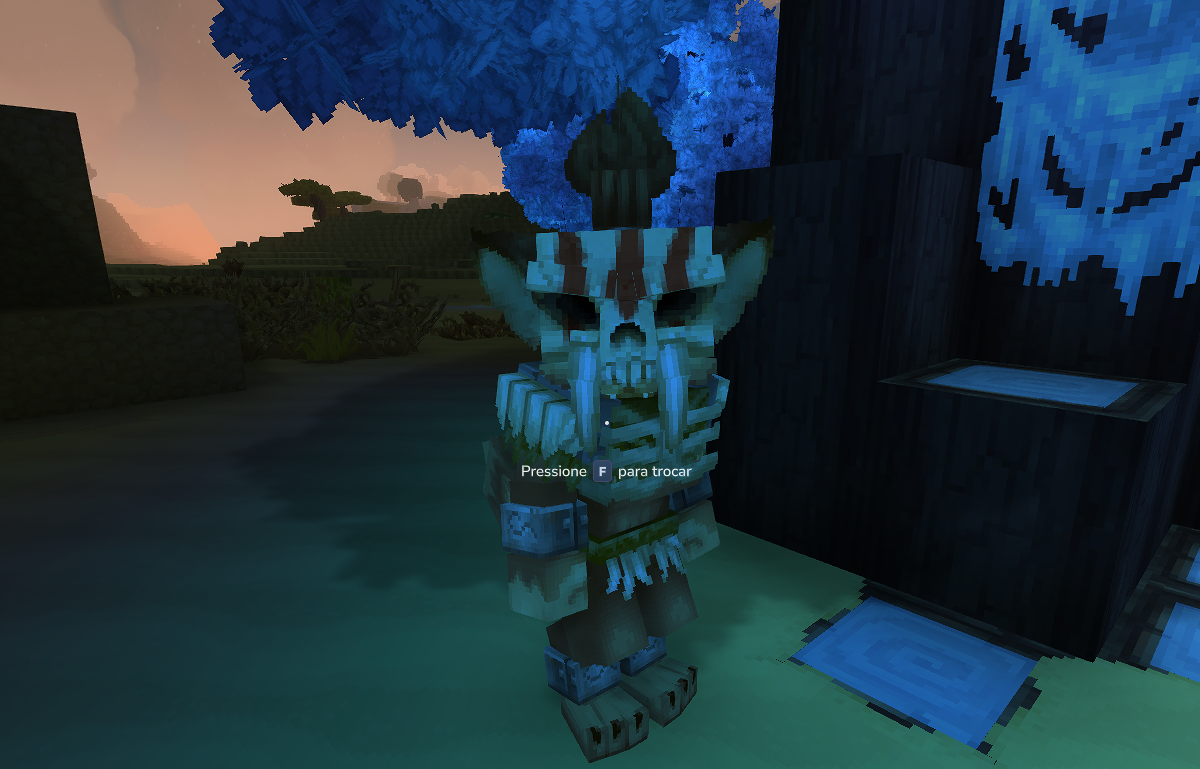
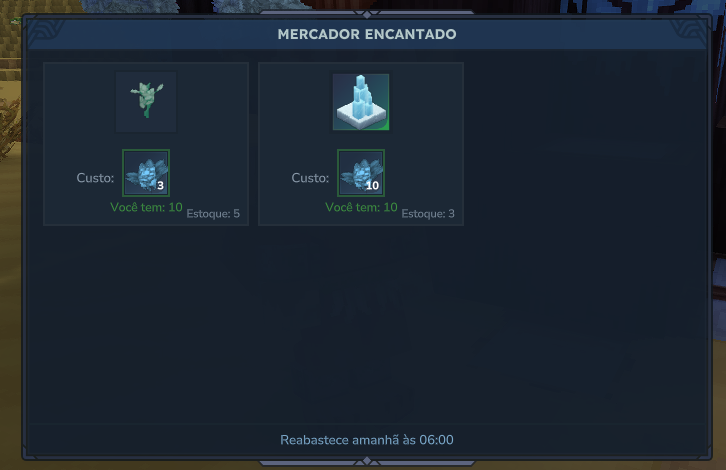
- Verify:
- The shop title shows “Enchanted Merchant”
- The trade shows: 3 Enchanted Fruit → 1 Enchanted Sapling
- You can complete the trade 5 times (Stock: 5)
- After buying all 5, the slot shows as sold out
Common errors and fixes:
| Error | Cause | Fix |
|---|---|---|
Unknown barter shop | Shop value in OpenBarterShop doesn’t match filename | Ensure "Shop": "Feran_Enchanted_Merchant" matches Feran_Enchanted_Merchant.json |
| No trade hint on hover | InteractionInstruction missing or malformed | Verify the SetInteractable action with Hint is present |
| NPC is hostile | Wrong attitude or template | Ensure DefaultPlayerAttitude is "Neutral" and Type is "Generic" |
| Trade shows wrong items | ItemId typo | Check that Plant_Fruit_Enchanted and Plant_Sapling_Enchanted match real item filenames |
| Shop never restocks | RefreshInterval missing | Add "RefreshInterval": { "Days": 2 } to the shop definition |
Vanilla Barter Shop Reference
| Vanilla File | Pattern | Trades |
|---|---|---|
Kweebec_Merchant.json | 3 Fixed + 2 Pool groups | Spices, Salt, Dough (fixed) + food and recipes (rotating) |
Klops_Merchant.json | 1 Fixed | Single construction sign trade |
Next Steps
- Custom NPC Spawning — place your merchant at specific world locations
- Create a Crafting Bench — let players craft items to trade with the merchant
- Drop Tables Reference — configure what items drop for trading material