
Create a Custom Weapon
What You’ll Build
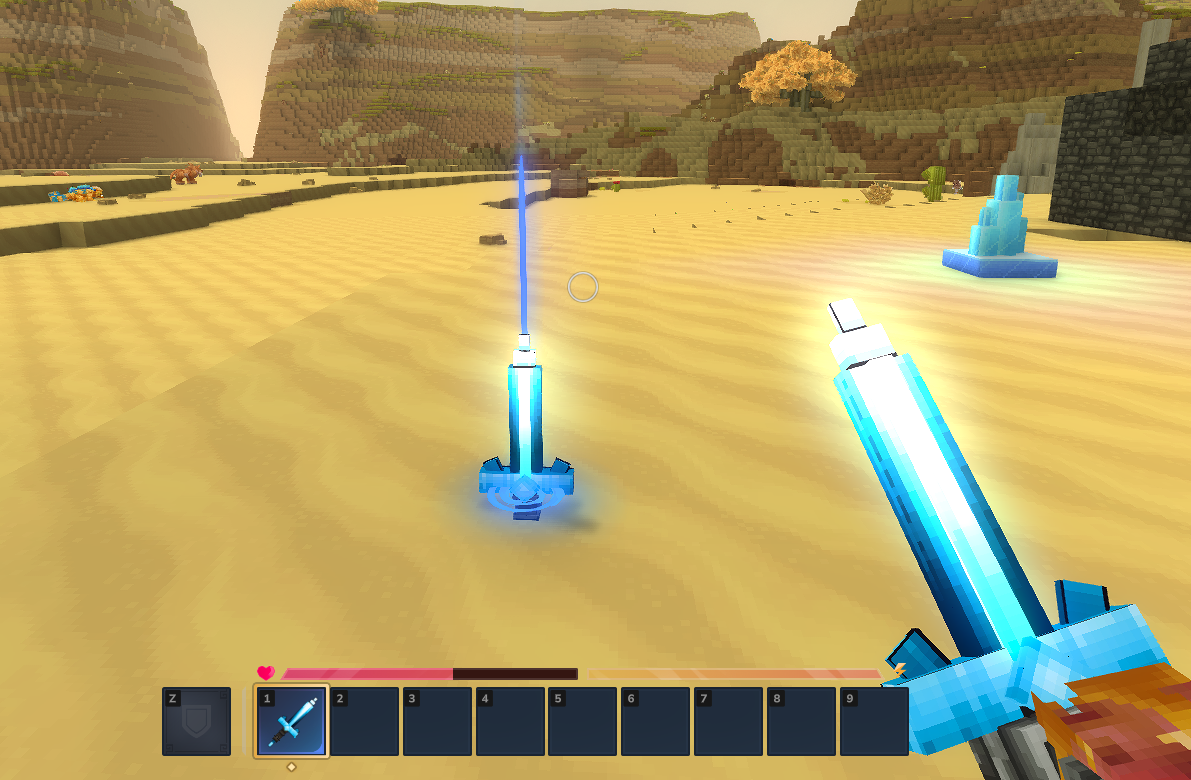
A Crystal Sword — a custom melee weapon crafted from glowing crystal blocks. It inherits Hytale’s sword combat system (swing combos, guard, signature attack), has its own 3D voxel model, hand-painted crystal texture, light emission, crafting recipe, and multilingual translations.
Prerequisites
- A mod folder with a valid
manifest.json(see Installation & Setup) - Blockbench with the Hytale plugin for authoring the 3D model
- The Create a Block tutorial completed (the Crystal Sword uses
Ore_Crystal_Glowas a crafting ingredient) - Basic familiarity with JSON (see JSON Basics)
Git Repository
The complete working mod is available as a GitHub repository:
https://github.com/nevesb/hytale-mods-custom-weaponClone it and copy the contents into your Hytale mods directory. The repository contains every file described in this tutorial:
hytale-mods-custom-weapon/├── manifest.json├── Weapon_Sword_Crystal_Glow.bbmodel (Blockbench source file)├── Common/│ ├── Items/Weapons/Crystal/│ │ ├── Weapon_Sword_Crystal_Glow.blockymodel (exported runtime model)│ │ └── Weapon_Sword_Crystal_Glow.png (texture)│ └── Icons/ItemsGenerated/│ └── Weapon_Sword_Crystal_Glow.png├── Server/│ ├── Item/Items/HytaleModdingManual/│ │ └── Weapon_Sword_Crystal_Glow.json│ └── Languages/│ ├── en-US/server.lang│ ├── pt-BR/server.lang│ └── es/server.langYour manifest:
{ "Group": "HytaleModdingManual", "Name": "CreateACustomWeapon", "Version": "1.0.0", "Description": "Implements the Create A Weapon tutorial with a custom crystal sword", "Authors": [ { "Name": "HytaleModdingManual" } ], "Dependencies": {}, "OptionalDependencies": {}, "IncludesAssetPack": true, "TargetServerVersion": "2026.02.19-1a311a592"}Step 1: Model the Sword in Blockbench
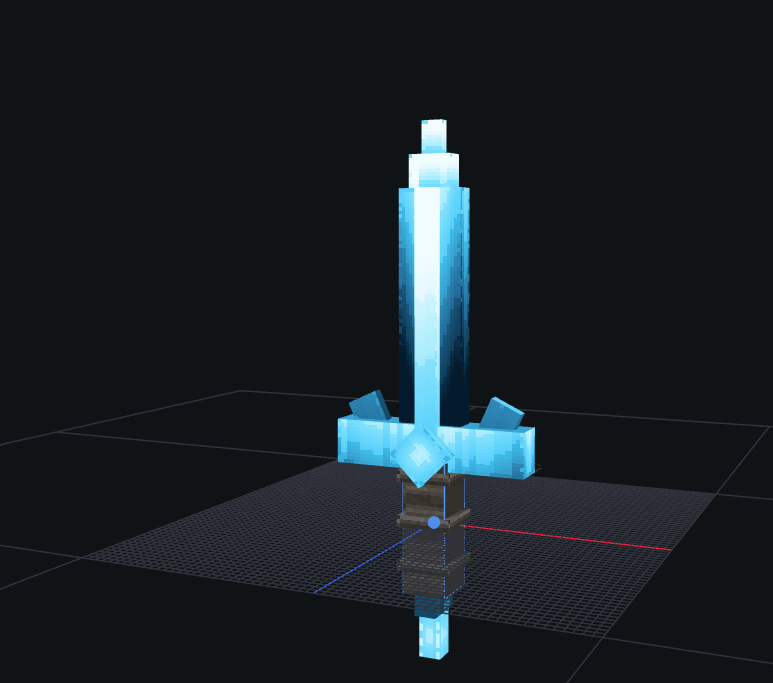
Open Blockbench and create a new Hytale Character format project. The sword is built from five sections, bottom to top:
| Section | Description | Dimensions |
|---|---|---|
| Pommel | Small crystal at the base | 3x6x3 |
| Handle | Dark leather-wrapped shaft with metal rings | 6x18x6 (shaft) + 7.5x1.5x7.5 (wraps) |
| Guard | Crystal base with diamond center and side blades | 27x6x4.5 (base) + 6x6x9 (diamond) + 4.5x9x1.5 (sides) |
| Blade | Main crystal prism with inner core | 9x36x3 (main) + 3x57x6 (core) |
| Tip | Tapered faceted point | 6x4.5x3 + 3x4.5x1.5 |
Modeling tips:
- Set the pivot point at the handle grip area (around Y=15) — Hytale uses this for hand positioning and light origin
- Use separate cubes for each crystal prism to create the faceted look
- Rotate guard crystals slightly outward (15-25 degrees) for a natural cluster appearance
- Total height should be ~72 voxels to match official Hytale weapon scale
- Use per-face UV (not box UV) for large cubes — box UV is limited to 32x32 UV space
- Set crystal blade and tip cubes to fullbright shading for the glow effect
Texturing:
- Use a hand-painted style with directional color blocking, not smooth gradients
- Crystal parts: vertical streaks of
#d9ffff(top) to#00bbee(mid) to#003050(base), core lighter than edges - Handle uses warm leather tones:
#2a2520with#3a3228stitch highlights - Wraps use metallic gray:
#484440with#5a5550shine - Texture resolution must match UV size: 128x128 (pixel density 64 / blockSize 64 = 1:1 ratio)
Export as Hytale Blocky Model and save to:
Common/Items/Weapons/Crystal/Weapon_Sword_Crystal_Glow.blockymodelCopy the texture PNG next to the blockymodel:
Common/Items/Weapons/Crystal/Weapon_Sword_Crystal_Glow.pngStep 2: Create the Item Definition
Hytale weapons use the Parent template system to inherit base combat animations, interactions, and sound effects. By setting "Parent": "Template_Weapon_Sword", our Crystal Sword automatically gets the full sword moveset: swing combos, guard, and the Vortexstrike signature ability.
Create the file at:
Server/Item/Items/HytaleModdingManual/Weapon_Sword_Crystal_Glow.json{ "Parent": "Template_Weapon_Sword", "TranslationProperties": { "Name": "server.items.Weapon_Sword_Crystal_Glow.name", "Description": "server.items.Weapon_Sword_Crystal_Glow.description" }, "Model": "Items/Weapons/Crystal/Weapon_Sword_Crystal_Glow.blockymodel", "Texture": "Items/Weapons/Crystal/Weapon_Sword_Crystal_Glow.png", "Icon": "Icons/ItemsGenerated/Weapon_Sword_Crystal_Glow.png", "Quality": "Rare", "ItemLevel": 30, "Tags": { "Type": [ "Weapon" ], "Family": [ "Sword" ] }, "IconProperties": { "Scale": 0.5, "Rotation": [0, 180, 45], "Translation": [-23, -23] }, "InteractionVars": { "Swing_Left_Damage": { "Interactions": [ { "Parent": "Weapon_Sword_Primary_Swing_Left_Damage", "DamageCalculator": { "BaseDamage": { "Physical": 14 } } } ] }, "Swing_Right_Damage": { "Interactions": [ { "Parent": "Weapon_Sword_Primary_Swing_Right_Damage", "DamageCalculator": { "BaseDamage": { "Physical": 14 } } } ] }, "Swing_Down_Damage": { "Interactions": [ { "Parent": "Weapon_Sword_Primary_Swing_Down_Damage", "DamageCalculator": { "BaseDamage": { "Physical": 24 } } } ] }, "Thrust_Damage": { "Interactions": [ { "Parent": "Weapon_Sword_Primary_Thrust_Damage", "DamageCalculator": { "BaseDamage": { "Physical": 36 } } } ] }, "Vortexstrike_Spin_Damage": { "Interactions": [ { "Parent": "Weapon_Sword_Signature_Vortexstrike_Spin_Damage", "DamageCalculator": { "BaseDamage": { "Physical": 26 } } } ] }, "Vortexstrike_Stab_Damage": { "Interactions": [ { "Parent": "Weapon_Sword_Signature_Vortexstrike_Stab_Damage", "DamageCalculator": { "BaseDamage": { "Physical": 72 } } } ] }, "Guard_Wield": { "Interactions": [ { "Parent": "Weapon_Sword_Secondary_Guard_Wield", "StaminaCost": { "Value": 8, "CostType": "Damage" } } ] } }, "Recipe": { "TimeSeconds": 5.0, "KnowledgeRequired": false, "Input": [ { "ItemId": "Ore_Crystal_Glow", "Quantity": 4 }, { "ItemId": "Ingredient_Bar_Iron", "Quantity": 2 } ], "BenchRequirement": [ { "Type": "Crafting", "Categories": [ "Weapon_Sword" ], "Id": "Weapon_Bench" } ] }, "Light": { "Radius": 2, "Color": "#468" }, "MaxDurability": 450, "DurabilityLossOnHit": 0.18}Key Item Fields
| Field | Type | Description |
|---|---|---|
Parent | string | Inherit from a template. Template_Weapon_Sword gives full sword combat: swing combos, guard, Vortexstrike signature. |
TranslationProperties | object | Name and Description translation keys for the UI. |
Model | string | Path to .blockymodel (relative to Common/). Must start with an allowed root: Items/, Blocks/, etc. |
Texture | string | Path to texture PNG (relative to Common/). Must start with an allowed root. |
Icon | string | Path to inventory icon PNG (relative to Common/). |
Quality | string | Rarity tier. Controls name color: Common, Uncommon, Rare, Epic, Legendary. |
ItemLevel | number | Progression tier for loot table weighting. |
Tags | object | Categorized tag groups. Type for item category, Family for weapon family. |
IconProperties | object | Controls 3D icon rendering: Scale, Rotation [X,Y,Z], Translation [X,Y]. |
InteractionVars | object | Override damage values for each attack in the inherited combo chain. |
Recipe | object | Crafting recipe with Input items, BenchRequirement, and TimeSeconds. |
Light | object | Emitted light. Radius (integer) and Color (hex shorthand). |
MaxDurability | number | Total hits before the weapon breaks. |
DurabilityLossOnHit | number | Fraction of durability lost per hit. |
Damage via InteractionVars
Unlike a simple Damage field, Hytale weapons define damage per attack in the combo chain using InteractionVars. Each variable name (e.g., Swing_Left_Damage) maps to a specific animation frame, and you override the DamageCalculator.BaseDamage to set how much damage that swing deals:
| Attack | Animation | Crystal Sword Damage |
|---|---|---|
Swing_Left_Damage | Left horizontal swing | 14 Physical |
Swing_Right_Damage | Right horizontal swing | 14 Physical |
Swing_Down_Damage | Overhead downward swing | 24 Physical |
Thrust_Damage | Forward thrust (combo finisher) | 36 Physical |
Vortexstrike_Spin_Damage | Signature spin attack | 26 Physical |
Vortexstrike_Stab_Damage | Signature stab finisher | 72 Physical |
Light Emission
Items can emit light using the Light field with Radius (integer, in blocks) and Color (hex shorthand). The Crystal Sword uses "Color": "#468" — a dim cyan glow at half the intensity of the Crystal Glow Block (#88ccff).
Step 3: Generate the Icon
Use the Resource Editor in Creative Mode to generate the inventory icon, just like the block tutorial:
- Open Hytale in Creative Mode
- Open the Resource Editor (top-right “Editor” button)
- Navigate to Item >
HytaleModdingManual>Weapon_Sword_Crystal_Glow - Click the pencil icon next to the Icon field
- Adjust
IconPropertiesfor the best isometric view - The generated icon saves to
Icons/ItemsGenerated/Weapon_Sword_Crystal_Glow.png
Step 4: Add Translations
Create language files for each locale:
English (Server/Languages/en-US/server.lang)
items.Weapon_Sword_Crystal_Glow.name = Crystal Sworditems.Weapon_Sword_Crystal_Glow.description = A blade forged from enchanted crystal. Radiates a soft blue glow.Portuguese (Server/Languages/pt-BR/server.lang)
items.Weapon_Sword_Crystal_Glow.name = Espada de Cristalitems.Weapon_Sword_Crystal_Glow.description = Uma lâmina forjada de cristal encantado. Irradia um brilho azul suave.Spanish (Server/Languages/es/server.lang)
items.Weapon_Sword_Crystal_Glow.name = Espada de Cristalitems.Weapon_Sword_Crystal_Glow.description = Una espada forjada de cristal encantado. Irradia un brillo azul suave.The key format is items.<ItemId>.<property>. If a key is missing for a locale, Hytale falls back to en-US.
Step 5: Package and Test
Your final mod folder:
CreateACustomWeapon/├── manifest.json├── Common/│ ├── Items/Weapons/Crystal/│ │ ├── Weapon_Sword_Crystal_Glow.blockymodel│ │ └── Weapon_Sword_Crystal_Glow.png│ └── Icons/ItemsGenerated/│ └── Weapon_Sword_Crystal_Glow.png├── Server/│ ├── Item/Items/HytaleModdingManual/│ │ └── Weapon_Sword_Crystal_Glow.json│ └── Languages/│ ├── en-US/server.lang│ ├── pt-BR/server.lang│ └── es/server.langTo test:
- Copy the mod folder into your Hytale mods directory (
%APPDATA%/Hytale/UserData/Mods/) - Start the game or reload the mod environment
- Grant yourself operator permissions and spawn the sword using chat commands:
/op self/spawnitem Weapon_Sword_Crystal_Glow
- Confirm:
- The crystal sword model renders correctly when held
- The crystal blade and tip glow with fullbright shading
- The sword emits a soft blue light around the player
- Sword swing animations play on left-click (4-hit combo)
- Guard activates on right-click
- The Vortexstrike signature ability works when energy is full
- The translated name and description appear in the tooltip
- The crafting recipe works at a Weapon Bench (4x Crystal Glow Block + 2x Iron Bar)
- Durability decreases on hit (450 max)
Weapon Creation Flow
flowchart TD;    A[Create 3D Model<br>in Blockbench] --> B[Export .blockymodel<br>to Items/ folder];    B --> C[Create Item Definition<br>with Parent Template];    C --> D[Define InteractionVars<br>per-attack damage];    D --> E[Add Recipe<br>and Light];    E --> F[Generate Icon<br>via Resource Editor];    F --> G[Add Translations<br>.lang files];    G --> H[Test In Game];
    style A fill:#2d5a27,color:#fff;    style F fill:#4a3d8f,color:#fff;    style H fill:#2d6a8f,color:#fff;
Common Pitfalls
| Problem | Cause | Fix |
|---|---|---|
Unexpected character: 5b, '[' | Tags defined as array [] instead of object {} | Use {"Type": ["Weapon"], "Family": ["Sword"]} |
Common Asset must be within the root | Model/Texture path doesn’t start with Items/, Blocks/, etc. | Move files under an allowed root like Items/Weapons/ |
Common Asset doesn't exist | Icon file missing from Common/Icons/ | Generate icon via Resource Editor or place a PNG manually |
NumberFormatException in Light | Radius is a decimal like 1.5 | Use an integer: 1, 2, 3, etc. |
| Texture looks broken in game | Texture resolution doesn’t match UV size | For Hytale Character format: texture must be UV size x (pixelDensity / blockSize). With defaults: texture = UV size |
Related Pages
- Create a Custom Block — Build the crystal block used as ingredient
- Create a Custom NPC — Create creatures that drop your weapon
- Item Definitions Reference — Full item schema
- Crafting Recipes — Recipe system reference
- Localization Keys — Translation system
- Mod Packaging — Distribution guide