
Custom Trees and Saplings
What You’ll Build
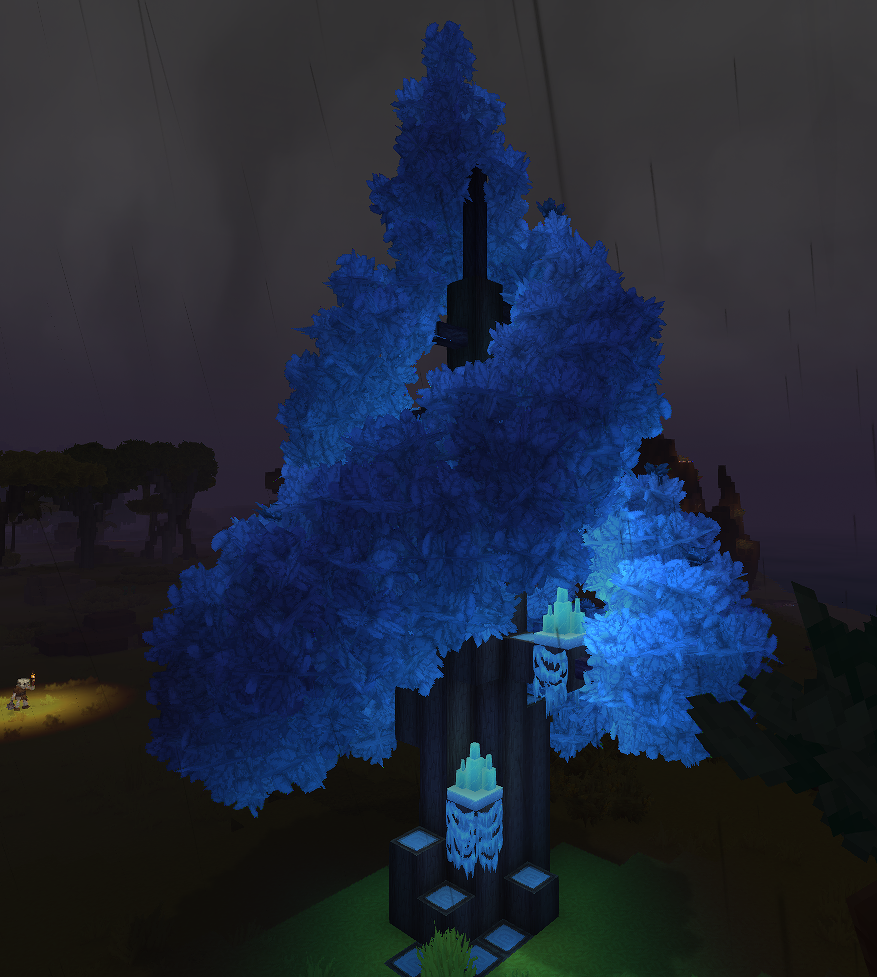
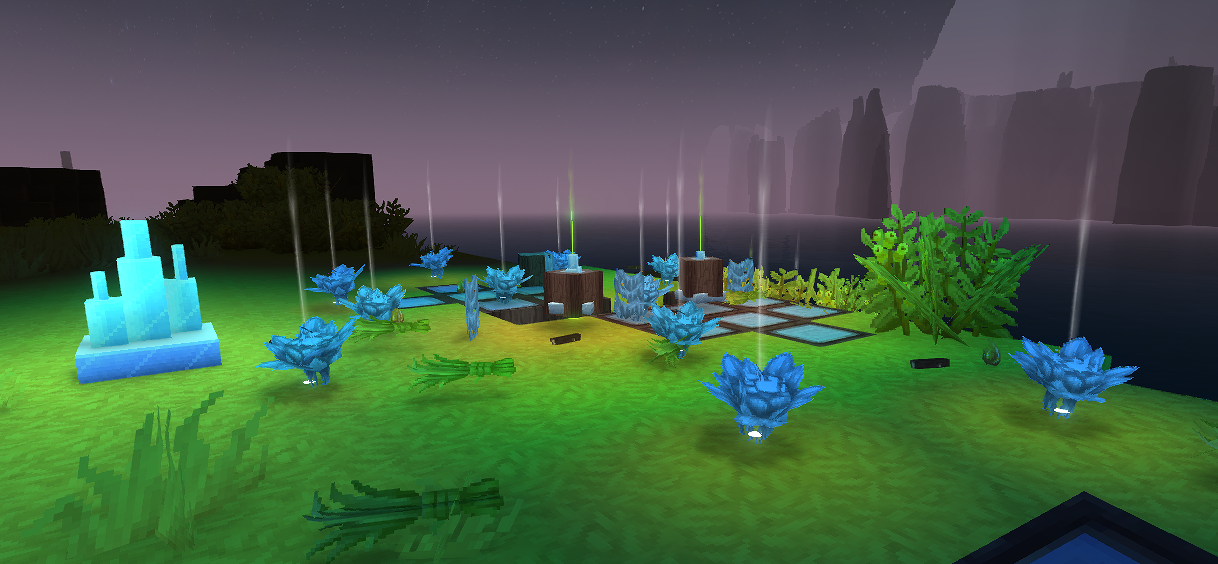
An Enchanted Tree — a custom tree type that players can grow from a sapling near Crystal Glow blocks. When fully grown, the tree provides Enchanted Wood (trunk blocks) for crafting, Light Shards (glowing fruit), and Crystal Moss decorative blocks. The tree uses Azure tree leaf models and Ash trunk as a base with custom textures and a unique crystal-light growth mechanic.
What You’ll Learn
- How Hytale trees are composed of multiple block types (trunk, leaves, fruit, sapling, moss)
- How
Parentinheritance creates tree variants from existing types - How the
Farmingsystem drives sapling growth through prefab stages - How to create a custom
Growth Modifierthat responds to specific light colors - How to configure light-emitting fruit blocks
- How
PrefabListregisters tree structures for the engine
Prerequisites
- Complete the Create a Custom Block tutorial first — this mod depends on the Crystal Glow Block created in that tutorial for its growth mechanic
- A mod folder with a valid
manifest.json(see Setup Your Dev Environment) - The Crystal Glow Block mod installed and working in your mods folder
- Custom textures for trunk, leaves, and fruit (or reuse Azure/Ash textures for testing)
Git Repository
The complete working mod is available as a GitHub repository:
https://github.com/nevesb/hytale-mods-custom-treeClone it and copy the contents to your Hytale mods directory to test immediately.
Tree System Overview
A Hytale tree is not a single asset — it is a composition of multiple block types plus a growth system that assembles them into a tree shape:
flowchart TD;    A[Sapling Block<br>Farming Stages] --> B[Stage 0 Prefab<br>Small Tree];    B --> C[Stage 1 Prefab<br>Medium Tree];    C --> D[Stage 2 Prefab<br>Large Tree];    D --> E[Stage 3 Prefab<br>Full Tree];
    F[Trunk Block] --> E;    G[Leaves Block] --> E;    H[Fruit Block] --> E;    I[Moss Blocks] --> E;
style A fill:#2d5a27,color:#fff; style E fill:#2d6a8f,color:#fff; style H fill:#8f6a2d,color:#fff;| Component | File Location | Purpose |
|---|---|---|
| Trunk | Server/Item/Items/Wood/ | The wood block — drops when chopped, used as building material |
| Leaves | Server/Item/Items/Plant/Leaves/ | Decorative canopy — decays when trunk is removed |
| Fruit | Server/Item/Items/Plant/Fruit/ | Harvestable item that grows on the tree — can glow, be consumed, or used as crafting material |
| Sapling | Server/Item/Items/Plant/ | Plantable block with Farming stages that grows into a tree over time |
| Moss | Server/Item/Items/Plant/Moss/ | Decorative blocks that grow on the trunk — wall moss and rug moss |
| Growth Modifier | Server/Farming/Modifiers/ | Controls what environmental conditions speed up growth |
| PrefabList | Server/PrefabList/ | Registry that tells the engine where to find the tree prefab files for each growth stage |
Each prefab (.prefab.json) is a blueprint containing the exact block positions that form the tree shape at that stage. The sapling’s Farming system transitions through these prefabs over time.
Step 1: Create the Trunk Block
The trunk is what players chop to get wood. We inherit from Wood_Ash_Trunk and override only the textures, gathering, and particle color.
Create Server/Item/Items/Wood/Enchanted/Wood_Enchanted_Trunk.json:
{ "TranslationProperties": { "Name": "server.items.Wood_Enchanted_Trunk.name", "Description": "server.items.Wood_Enchanted_Trunk.description" }, "Parent": "Wood_Ash_Trunk", "BlockType": { "Textures": [ { "Sides": "BlockTextures/Wood_Trunk_Crystal_Side.png", "UpDown": "BlockTextures/Wood_Trunk_Crystal_Top.png", "Weight": 1 } ], "Gathering": { "Breaking": { "ItemId": "Wood_Enchanted_Trunk", "GatherType": "Woods" } }, "ParticleColor": "#5e3b56" }, "ResourceTypes": [ { "Id": "Wood_Trunk" }, { "Id": "Wood_All" }, { "Id": "Fuel" }, { "Id": "Charcoal" } ], "Icon": "Icons/ItemsGenerated/Wood_Enchanted_Trunk.png", "IconProperties": { "Scale": 0.58823, "Rotation": [22.5, 45, 22.5], "Translation": [0, -13.5] }}Trunk Fields
| Field | Type | Purpose |
|---|---|---|
Parent | String | Inherits all block properties from Wood_Ash_Trunk (hardness, tool requirements, physics) |
BlockType.Textures | Array | Texture configuration. Sides for the bark, UpDown for the cross-section when viewed from top/bottom |
BlockType.Textures[].Weight | Number | For multiple texture variants — 1 means this is the only option |
BlockType.Gathering.Breaking | Object | What drops when the block is broken. GatherType: "Woods" means axes break it faster |
BlockType.ParticleColor | String | Hex color of particles when the block is hit or broken |
ResourceTypes | Array | Tags this block as wood for crafting recipes. Wood_Trunk and Wood_All let it be used in any recipe requiring wood |
IconProperties | Object | Controls how the 3D model renders as an inventory icon (scale, rotation, position) |
Step 2: Create the Leaves Block
Leaves use a shared 3D model (Ball.blockymodel) with a custom texture for color. They inherit all decay and physics behavior from the Azure leaves template.
Create Server/Item/Items/Plant/Leaves/Plant_Leaves_Enchanted.json:
{ "TranslationProperties": { "Name": "server.items.Plant_Leaves_Enchanted.name" }, "Parent": "Plant_Leaves_Azure", "Icon": "Icons/ItemsGenerated/Plant_Leaves_Enchanted.png", "BlockType": { "CustomModel": "Blocks/Foliage/Leaves/Ball.blockymodel", "CustomModelTexture": [ { "Texture": "Blocks/Foliage/Leaves/Ball_Textures/Crystal.png", "Weight": 1 } ], "ParticleColor": "#1c7baf" }}Leaves Fields
| Field | Type | Purpose |
|---|---|---|
Parent | String | Inherits from Plant_Leaves_Azure — gets leaf decay, transparency, and break behavior |
BlockType.CustomModel | String | Shared leaf model. All tree types use the same Ball.blockymodel shape |
BlockType.CustomModelTexture | Array | Color texture applied to the model. Change this PNG to change the leaf color |
BlockType.ParticleColor | String | Color of particles when leaves are broken. Use a color that matches the texture |
The Ball.blockymodel is a shared vanilla model at Common/Blocks/Foliage/Leaves/Ball.blockymodel. You only need to provide a custom texture in Common/Blocks/Foliage/Leaves/Ball_Textures/Crystal.png.
Step 3: Create the Fruit Block (Light Shards)
The fruit is the key crafting material — Light Shards that glow on the tree and drop when harvested. This block emits light, is transparent, and can be consumed as food.
Create Server/Item/Items/Plant/Fruit/Plant_Fruit_Enchanted.json:
{ "TranslationProperties": { "Name": "server.items.Plant_Fruit_Enchanted.name", "Description": "server.items.Plant_Fruit_Enchanted.description" }, "Parent": "Template_Fruit", "BlockType": { "CustomModel": "Resources/Ingredients/Crystal_Fruit.blockymodel", "CustomModelTexture": [ { "Texture": "Resources/Ingredients/Crystal_Fruit_Texture.png", "Weight": 1 } ], "VariantRotation": "UpDown", "Opacity": "Transparent", "Light": { "Color": "#469" }, "BlockSoundSetId": "Mushroom", "BlockParticleSetId": "Dust", "ParticleColor": "#326ea7", "Gathering": { "Harvest": { "ItemId": "Plant_Fruit_Enchanted" }, "Soft": { "ItemId": "Plant_Fruit_Enchanted" } } }, "InteractionVars": { "Consume_Charge": { "Interactions": [ { "Parent": "Consume_Charge_Food_T1_Inner", "Effects": { "Particles": [ { "SystemId": "Food_Eat", "Color": "#326ea7", "TargetNodeName": "Mouth", "TargetEntityPart": "Entity" } ] } } ] } }, "Icon": "Icons/ItemsGenerated/Plant_Fruit_Enchanted.png", "Scale": 1.75, "DropOnDeath": true, "Quality": "Common"}Fruit Fields
| Field | Type | Purpose |
|---|---|---|
Parent | String | Inherits from Template_Fruit — gets harvesting behavior, food consumption logic |
BlockType.CustomModel | String | 3D model for the fruit. Create in Blockbench or reuse an existing fruit model |
BlockType.Opacity | String | "Transparent" — the fruit block doesn’t block light or vision |
BlockType.Light.Color | String | Hex color of emitted light. "#469" gives a soft blue glow matching the crystal theme |
BlockType.VariantRotation | String | "UpDown" — the fruit hangs in different orientations for natural variety |
BlockType.Gathering.Harvest | Object | What drops when right-clicking the fruit. Allows collecting without breaking the block |
BlockType.Gathering.Soft | Object | What drops when breaking the fruit block. Same item, but the block is destroyed |
InteractionVars | Object | Defines what happens when consumed. Inherits from Consume_Charge_Food_T1_Inner for basic food healing |
Scale | Number | Visual scale multiplier. 1.75 makes the fruit more visible on the tree |
DropOnDeath | Boolean | true — the fruit drops as an item when the block is destroyed (tree chopped or leaves decay) |
Step 4: Create the Moss Blocks
Moss blocks grow on and around the tree trunk, adding visual detail. We create two types: wall moss (attaches to trunk sides) and rug moss (spreads on the ground near the base). Both use Tint to recolor the vanilla blue moss textures to match our crystal theme.
Wall Moss
Create Server/Item/Items/Plant/Moss/Plant_Moss_Wall_Crystal.json:
{ "TranslationProperties": { "Name": "server.items.Plant_Moss_Wall_Crystal.name" }, "Parent": "Plant_Moss_Wall_Blue", "BlockType": { "Gathering": { "Soft": { "ItemId": "Plant_Moss_Wall_Crystal" }, "UseDefaultDropWhenPlaced": true }, "Tint": ["#88ccff"], "ParticleColor": "#88ccff" }, "Icon": "Icons/ItemsGenerated/Plant_Moss_Wall_Crystal.png", "IconProperties": { "Scale": 0.58823, "Rotation": [22.5, 45, 22.5], "Translation": [10, -14] }}Rug Moss
Create Server/Item/Items/Plant/Moss/Plant_Moss_Rug_Crystal.json:
{ "TranslationProperties": { "Name": "server.items.Plant_Moss_Rug_Crystal.name" }, "Parent": "Plant_Moss_Rug_Blue", "BlockType": { "Gathering": { "Soft": { "ItemId": "Plant_Moss_Rug_Crystal" }, "UseDefaultDropWhenPlaced": true }, "Light": { "Color": "#246" }, "Tint": ["#88ccff"], "ParticleColor": "#88ccff" }, "Icon": "Icons/ItemsGenerated/Plant_Moss_Rug_Crystal.png", "IconProperties": { "Scale": 0.58823, "Rotation": [22.5, 45, 22.5], "Translation": [0, -7] }}Moss Fields
| Field | Type | Purpose |
|---|---|---|
Parent | String | Plant_Moss_Wall_Blue or Plant_Moss_Rug_Blue — inherits model, placement rules, and decay behavior |
BlockType.Tint | Array | Color tint applied over the parent texture. "#88ccff" shifts the blue moss to a crystal blue matching the tree theme |
BlockType.Light.Color | String | Rug moss emits a faint "#246" glow, adding subtle ground lighting around the tree base |
BlockType.Gathering.Soft | Object | What drops when breaking the moss. Returns itself |
BlockType.Gathering.UseDefaultDropWhenPlaced | Boolean | true — uses the vanilla default drop behavior when the block is placed by a player |
Step 5: Create the Sapling
The sapling is the most complex piece — it’s a plantable block that inherits from Plant_Sapling_Oak and uses the Farming system to grow through prefab stages over time. It also uses a custom CrystalGlow growth modifier that makes the tree grow only near Crystal Glow block light.
Create Server/Item/Items/Plant/Plant_Sapling_Enchanted.json:
{ "TranslationProperties": { "Name": "server.items.Plant_Sapling_Enchanted.name", "Description": "server.items.Plant_Sapling_Enchanted.description" }, "Parent": "Plant_Sapling_Oak", "BlockType": { "CustomModelTexture": [ { "Texture": "Blocks/Foliage/Tree/Sapling_Textures/Crystal.png", "Weight": 1 } ], "ParticleColor": "#44aacc", "Farming": { "Stages": { "Default": [ { "Block": "Plant_Sapling_Enchanted", "Duration": { "Min": 500000, "Max": 800000 }, "Type": "BlockType" }, { "Prefabs": [ { "Path": "Trees/Enchanted/Stage_0/Enchanted_Stage0_001.prefab.json", "Weight": 1 } ], "Duration": { "Min": 500000, "Max": 800000 }, "Type": "Prefab", "ReplaceMaskTags": ["Soil"], "SoundEventId": "SFX_Crops_Grow" }, { "Prefabs": [ { "Path": "Trees/Enchanted/Stage_1/Enchanted_Stage1_001.prefab.json", "Weight": 1 } ], "Duration": { "Min": 500000, "Max": 800000 }, "Type": "Prefab", "ReplaceMaskTags": ["Soil"], "SoundEventId": "SFX_Crops_Grow" }, { "Prefabs": [ { "Path": "Trees/Enchanted/Stage_2/Enchanted_Stage2_001.prefab.json", "Weight": 1 } ], "Duration": { "Min": 500000, "Max": 800000 }, "Type": "Prefab", "ReplaceMaskTags": ["Soil"], "SoundEventId": "SFX_Crops_Grow" }, { "Prefabs": [ { "Path": "Trees/Enchanted/Stage_3/Enchanted_Stage3_001.prefab.json", "Weight": 1 } ], "Type": "Prefab", "ReplaceMaskTags": ["Soil"], "SoundEventId": "SFX_Crops_Grow" } ] }, "StartingStageSet": "Default", "ActiveGrowthModifiers": ["CrystalGlow"] }, "Gathering": { "Soft": { "ItemId": "Plant_Sapling_Enchanted" } } }, "Icon": "Icons/ItemsGenerated/Plant_Sapling_Enchanted.png", "IconProperties": { "Scale": 0.58823, "Rotation": [0, 0, 0], "Translation": [0, -13.5] }}How Farming Stages Work
The Farming.Stages.Default array defines the growth progression:
flowchart LR;    A[Stage 0<br>Sapling Block<br>500-800k ticks] --> B[Stage 1<br>Small Prefab<br>500-800k ticks];    B --> C[Stage 2<br>Medium Prefab<br>500-800k ticks];    C --> D[Stage 3<br>Large Prefab<br>500-800k ticks];    D --> E[Stage 4<br>Full Tree<br>Permanent];
style A fill:#2d5a27,color:#fff; style E fill:#2d6a8f,color:#fff;| Stage | Type | What Happens |
|---|---|---|
| 0 | BlockType | The sapling block itself sits in the world. After 500,000–800,000 ticks, it transitions to the first prefab |
| 1 | Prefab | The engine replaces the sapling with a small tree prefab (a few trunk + leaf blocks) |
| 2 | Prefab | Replaces with a medium tree prefab (taller, more leaves) |
| 3 | Prefab | Replaces with a large tree prefab (branches, fruit start appearing) |
| 4 | Prefab | The final, fully grown tree. No Duration — it stays permanently |
Sapling Key Differences from Scratch
Because we inherit from Plant_Sapling_Oak, the sapling already has:
DrawType: "Model"andCustomModel: "Blocks/Foliage/Tree/Sapling.blockymodel"BlockEntity.Components.FarmingBlock: {}Support.Downrequiring soilHitboxType: "Plant_Large"Group: "Wood"andRandomRotation: "YawStep1"- Categories, tags, interactions, and sound sets
We only need to override: the texture, particle color, farming stages (to point to our own prefabs), gathering (to drop our sapling), and the growth modifier.
Key Farming Fields
| Field | Type | Purpose |
|---|---|---|
Stages.Default[].Type | String | "BlockType" for the sapling block, "Prefab" for tree model stages |
Stages.Default[].Block | String | For BlockType stages: the block ID (the sapling itself) |
Stages.Default[].Prefabs | Array | For Prefab stages: list of prefab paths with weights for random selection |
Stages.Default[].Duration | Object | Min/Max in game ticks. The engine picks a random value. Omit on the final stage to make it permanent |
Stages.Default[].ReplaceMaskTags | Array | Block tags that prefabs can replace. "Soil" lets roots push into dirt |
Stages.Default[].SoundEventId | String | Sound played when transitioning to this stage |
StartingStageSet | String | Which stage set to begin with. "Default" is standard |
ActiveGrowthModifiers | Array | Growth modifier IDs. "CrystalGlow" is our custom modifier defined in the next step |
Step 6: Create the Crystal Glow Growth Modifier
This is what makes the Enchanted Tree unique — it only grows near Crystal Glow blocks (#88ccff light). The modifier filters light by RGB color to ensure only the right light source triggers growth.
Create Server/Farming/Modifiers/CrystalGlow.json:
{ "Type": "LightLevel", "Modifier": 2500, "ArtificialLight": { "Red": { "Min": 0, "Max": 5 }, "Green": { "Min": 1, "Max": 127 }, "Blue": { "Min": 1, "Max": 127 } }, "Sunlight": { "Min": 0, "Max": 5 }, "RequireBoth": true}Growth Modifier Fields
| Field | Type | Purpose |
|---|---|---|
Type | String | "LightLevel" — this modifier checks light conditions at the sapling’s position |
Modifier | Number | Growth speed multiplier. 2500 gives a massive boost, making the tree grow fast near crystal light |
ArtificialLight.Red | Object | RGB filter — Red 0-5 filters out torches and other warm light sources (high red component) |
ArtificialLight.Green | Object | Green 1-127 accepts the green component of Crystal Glow light |
ArtificialLight.Blue | Object | Blue 1-127 accepts the blue component of Crystal Glow light |
Sunlight | Object | 0-5 — the tree only grows in darkness or deep shade (sunlight inhibits growth) |
RequireBoth | Boolean | true — both artificial light AND sunlight conditions must be met simultaneously |
Step 7: Register the PrefabList
The PrefabList tells the engine where to scan for your tree’s prefab files. Each growth stage has its own directory.
Create Server/PrefabList/Trees_Enchanted.json:
{ "Prefabs": [ { "RootDirectory": "Asset", "Path": "Trees/Enchanted/Stage_0/", "Recursive": true }, { "RootDirectory": "Asset", "Path": "Trees/Enchanted/Stage_1/", "Recursive": true }, { "RootDirectory": "Asset", "Path": "Trees/Enchanted/Stage_2/", "Recursive": true }, { "RootDirectory": "Asset", "Path": "Trees/Enchanted/Stage_3/", "Recursive": true } ]}PrefabList Fields
| Field | Type | Purpose |
|---|---|---|
Prefabs | Array | List of directory entries to scan |
RootDirectory | String | "Asset" — relative to the mod’s Server/Prefabs/ directory |
Path | String | Subdirectory containing .prefab.json files for one growth stage |
Recursive | Boolean | true — scan subdirectories as well |
The actual .prefab.json files contain block position data that forms the tree shape. These are created using the Hytale prefab editor in Creative Mode and contain references to the block types we defined above (trunk, leaves, fruit, moss). The prefabs are included in the companion repository.
Step 8: Add Translations
Create language files under Server/Languages/:
Server/Languages/en-US/server.lang
items.Wood_Enchanted_Trunk.name = Enchanted Wooditems.Wood_Enchanted_Trunk.description = Shimmering wood harvested from an Enchanted Tree.items.Plant_Leaves_Enchanted.name = Enchanted Leavesitems.Plant_Fruit_Enchanted.name = Light Sharditems.Plant_Fruit_Enchanted.description = A glowing fruit from the Enchanted Tree. Used to craft light-infused ammunition.items.Plant_Sapling_Enchanted.name = Enchanted Saplingitems.Plant_Sapling_Enchanted.description = Plant on soil to grow an Enchanted Tree.items.Plant_Moss_Wall_Crystal.name = Crystal Wall Mossitems.Plant_Moss_Rug_Crystal.name = Crystal Moss RugServer/Languages/es/server.lang
items.Wood_Enchanted_Trunk.name = Madera Encantadaitems.Wood_Enchanted_Trunk.description = Madera reluciente cosechada de un Arbol Encantado.items.Plant_Leaves_Enchanted.name = Hojas Encantadasitems.Plant_Fruit_Enchanted.name = Fragmento de Luzitems.Plant_Fruit_Enchanted.description = Una fruta brillante del Arbol Encantado. Se usa para fabricar municion infundida con luz.items.Plant_Sapling_Enchanted.name = Brote Encantadoitems.Plant_Sapling_Enchanted.description = Planta en tierra para hacer crecer un Arbol Encantado.items.Plant_Moss_Wall_Crystal.name = Musgo de Pared Cristalinoitems.Plant_Moss_Rug_Crystal.name = Alfombra de Musgo CristalinoServer/Languages/pt-BR/server.lang
items.Wood_Enchanted_Trunk.name = Madeira Encantadaitems.Wood_Enchanted_Trunk.description = Madeira reluzente colhida de uma Arvore Encantada.items.Plant_Leaves_Enchanted.name = Folhas Encantadasitems.Plant_Fruit_Enchanted.name = Fragmento de Luzitems.Plant_Fruit_Enchanted.description = Uma fruta brilhante da Arvore Encantada. Usada para fabricar municao infundida com luz.items.Plant_Sapling_Enchanted.name = Muda Encantadaitems.Plant_Sapling_Enchanted.description = Plante em solo para cultivar uma Arvore Encantada.items.Plant_Moss_Wall_Crystal.name = Musgo de Parede Cristalinoitems.Plant_Moss_Rug_Crystal.name = Tapete de Musgo CristalinoStep 9: Complete Mod Structure
CreateACustomTree/├── manifest.json├── Common/│ ├── BlockTextures/│ │ ├── Wood_Trunk_Crystal_Side.png│ │ └── Wood_Trunk_Crystal_Top.png│ ├── Blocks/Foliage/│ │ ├── Leaves/│ │ │ ├── Ball.blockymodel│ │ │ └── Ball_Textures/│ │ │ └── Crystal.png│ │ └── Tree/│ │ ├── Sapling.blockymodel│ │ └── Sapling_Textures/│ │ └── Crystal.png│ ├── Resources/Ingredients/│ │ ├── Crystal_Fruit.blockymodel│ │ └── Crystal_Fruit_Texture.png│ └── Icons/ItemsGenerated/│ ├── Wood_Enchanted_Trunk.png│ ├── Plant_Sapling_Enchanted.png│ ├── Plant_Fruit_Enchanted.png│ ├── Plant_Leaves_Enchanted.png│ ├── Plant_Moss_Wall_Crystal.png│ └── Plant_Moss_Rug_Crystal.png├── Server/│ ├── Farming/Modifiers/│ │ └── CrystalGlow.json│ ├── Item/Items/│ │ ├── Wood/Enchanted/│ │ │ └── Wood_Enchanted_Trunk.json│ │ └── Plant/│ │ ├── Leaves/│ │ │ └── Plant_Leaves_Enchanted.json│ │ ├── Fruit/│ │ │ └── Plant_Fruit_Enchanted.json│ │ ├── Moss/│ │ │ ├── Plant_Moss_Wall_Crystal.json│ │ │ └── Plant_Moss_Rug_Crystal.json│ │ └── Plant_Sapling_Enchanted.json│ ├── PrefabList/│ │ └── Trees_Enchanted.json│ ├── Prefabs/Trees/Enchanted/│ │ ├── Stage_0/Enchanted_Stage0_001.prefab.json│ │ ├── Stage_1/Enchanted_Stage1_001.prefab.json│ │ ├── Stage_2/Enchanted_Stage2_001.prefab.json│ │ └── Stage_3/Enchanted_Stage3_001.prefab.json│ └── Languages/│ ├── en-US/server.lang│ ├── es/server.lang│ └── pt-BR/server.langStep 10: Test In-Game
- Copy the mod folder to
%APPDATA%/Hytale/UserData/Mods/ - Also install the Crystal Glow Block mod — it’s required for the growth mechanic
- Launch Hytale and enter Creative Mode
- Grant yourself operator permissions and spawn the items:
/op self/spawnitem Wood_Enchanted_Trunk/spawnitem Plant_Sapling_Enchanted/spawnitem Plant_Fruit_Enchanted/spawnitem Ore_Crystal_Glow
- Place the trunk and verify the custom texture appears
- Place Crystal Glow blocks in a dark area (underground or at night)
- Place the sapling on soil near the Crystal Glow blocks and confirm:
- It renders with the crystal sapling texture
- It requires soil below (breaks if soil is removed)
- Breaking it returns the sapling item
- Wait for growth — the CrystalGlow modifier gives a 2500x speed boost, so growth should be fast near the crystal light
- Verify the fully grown tree has:
- Enchanted trunk blocks with crystal-blue textures
- Crystal leaves in ice-blue color
- Glowing Light Shard fruit
- Crystal Moss on the trunk and ground
Common Pitfalls
| Problem | Cause | Fix |
|---|---|---|
| Sapling places but never grows | Missing FarmingBlock component or no crystal light | Ensure sapling inherits from Plant_Sapling_Oak (has FarmingBlock) and place Crystal Glow blocks nearby in darkness |
Unknown prefab path | Prefab file missing or wrong path | Verify .prefab.json files exist at the paths referenced in Farming.Stages |
| Sapling floats in air | Missing Support | Inherited from Plant_Sapling_Oak — ensure parent is correct |
| Fruit doesn’t glow | Wrong Light format | Use "Light": { "Color": "#469" } inside BlockType (not at root level) |
| Leaves use wrong model | CustomModel path incorrect | Shared models like Ball.blockymodel are at Blocks/Foliage/Leaves/Ball.blockymodel |
| Growth too slow | CrystalGlow modifier not activating | Check that Crystal Glow blocks are placed nearby, area is dark (sunlight 0-5), and no warm lights (torches) are near |
| Moss color wrong | Tint not applied | Ensure Tint is an array: ["#88ccff"], not a string |
| Tree grows with any light | Wrong ActiveGrowthModifiers | Use ["CrystalGlow"] not generic ["LightLevel"] |
How This Connects
The Enchanted Tree provides key materials for the rest of the tutorial series:
- Enchanted Wood → used as the handle material when crafting the Crystal Sword and Crystal Crossbow
- Light Shards → used as ammunition for the Crystal Crossbow’s light bolts
Next tutorial: Custom Loot Tables — configure advanced drop tables so the Enchanted Tree and Slime drop the right materials with proper weights.