
Tiendas de NPCs y Comercio
Objetivo
Crear un Mercader Feran Longtooth — un NPC pasivo que ofrece intercambios de trueque, cambiando Enchanted Fruit por Enchanted Saplings y bloques Crystal Glow. Construirás la definición de la tienda, configurarás el rol del NPC con lógica de interacción, y conectarás todo para que los jugadores puedan hacer clic derecho en el NPC para comerciar.
Lo que Aprenderás
- Cómo las definiciones de tiendas de trueque controlan los inventarios de comercio de NPCs
- Cómo los espacios de comercio
Fixedofrecen intercambios siempre disponibles - Cómo los espacios de comercio
Poolcrean stock rotativo aleatorio - Cómo
InteractionInstructionconOpenBarterShopconecta la tienda a un NPC - Cómo
Stock,RefreshIntervalyRestockHourgestionan los resets de inventario
Requisitos Previos
- Un entorno de mod funcional (ver Configura tu Entorno de Desarrollo)
- El mod Enchanted Tree instalado (ver Árboles y Retoños Personalizados) — proporciona
Plant_Fruit_EnchantedyPlant_Sapling_Enchanted - El NPC Slime con tabla de botín (ver Tablas de Botín Personalizadas) — el Slime suelta Enchanted Fruit
Repositorio del mod complementario: hytale-mods-custom-shop
Descripción General de la Tienda de Trueque
Las tiendas de trueque se encuentran en Server/BarterShops/ y definen lo que un NPC mercader vende. Hytale usa un sistema de trueque — los jugadores intercambian objetos directamente por otros objetos, no hay moneda.
Cada intercambio tiene un Input (lo que el jugador paga) y un Output (lo que el jugador recibe). El juego vanilla incluye dos mercaderes:
- Kweebec Merchant — 3 intercambios fijos + 2 grupos pool con stock rotativo, se reabastece cada 3 días
- Klops Merchant — 1 intercambio fijo, se reabastece diariamente
Paso 1: Configurar la Estructura de Archivos del Mod
NPCShopsAndTrading/├── manifest.json├── Server/│ ├── BarterShops/│ │ └── Feran_Enchanted_Merchant.json│ ├── NPC/│ │ └── Roles/│ │ └── Feran_Enchanted_Merchant.json│ └── Languages/│ ├── en-US/│ │ └── server.lang│ ├── es/│ │ └── server.lang│ └── pt-BR/│ └── server.langmanifest.json
{ "Group": "HytaleModdingManual", "Name": "NPCShopsAndTrading", "Version": "1.0.0", "Description": "Feran Longtooth merchant that trades Enchanted Fruit for Enchanted Saplings", "Authors": [ { "Name": "HytaleModdingManual" } ], "Dependencies": {}, "OptionalDependencies": {}, "IncludesAssetPack": false, "TargetServerVersion": "2026.02.19-1a311a592"}Ten en cuenta que IncludesAssetPack es false — este mod solo agrega archivos JSON del lado del servidor. El modelo Feran Longtooth ya existe en el juego vanilla, así que no necesitamos una carpeta Common/.
Paso 2: Crear la Definición de la Tienda de Trueque
La definición de la tienda controla qué intercambios aparecen en la interfaz cuando el jugador interactúa con el mercader.
Crea Server/BarterShops/Feran_Enchanted_Merchant.json:
{ "DisplayNameKey": "server.barter.feran_enchanted_merchant.title", "RefreshInterval": { "Days": 2 }, "RestockHour": 6, "TradeSlots": [ { "Type": "Fixed", "Trade": { "Output": { "ItemId": "Plant_Sapling_Enchanted", "Quantity": 1 }, "Input": [{ "ItemId": "Plant_Fruit_Enchanted", "Quantity": 3 }], "Stock": 5 } }, { "Type": "Fixed", "Trade": { "Output": { "ItemId": "Ore_Crystal_Glow", "Quantity": 1 }, "Input": [{ "ItemId": "Plant_Fruit_Enchanted", "Quantity": 10 }], "Stock": 3 } } ]}Campos de la Tienda
| Campo | Propósito |
|---|---|
DisplayNameKey | Clave de traducción para el título de la tienda mostrado en la interfaz de comercio |
RefreshInterval.Days | Número de días del juego entre reabastecimientos de stock |
RestockHour | Hora del día (0-24) cuando ocurre el reabastecimiento. 6 = 6 AM |
TradeSlots | Array de definiciones de espacios de comercio (Fixed o Pool) |
Esta tienda tiene dos intercambios fijos:
| Intercambio | Input | Output | Stock |
|---|---|---|---|
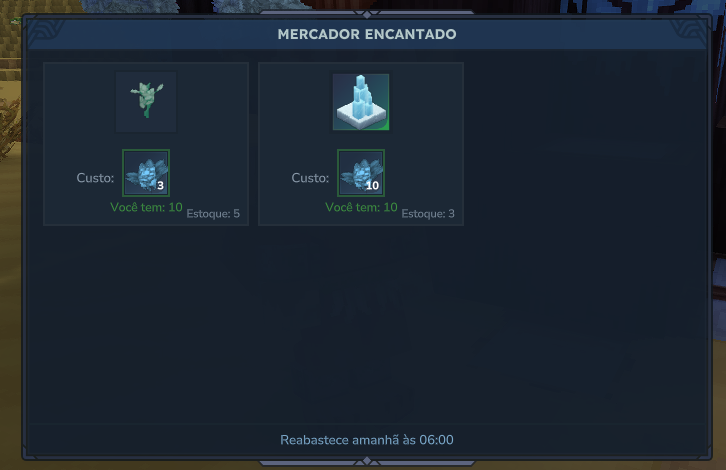
| Retoño | 3 Enchanted Fruit | 1 Enchanted Sapling | 5 por reabastecimiento |
| Cristal | 10 Enchanted Fruit | 1 Crystal Glow block | 3 por reabastecimiento |
El bloque Crystal Glow es más caro (10 frutas vs 3) y tiene menor stock, haciéndolo un intercambio premium.
Paso 3: Entendiendo los Tipos de Espacios de Comercio
Espacios Fijos
Los espacios fijos siempre aparecen en la tienda y ofrecen el mismo intercambio:
{ "Type": "Fixed", "Trade": { "Output": { "ItemId": "Plant_Sapling_Enchanted", "Quantity": 1 }, "Input": [{ "ItemId": "Plant_Fruit_Enchanted", "Quantity": 3 }], "Stock": 5 }}| Campo | Propósito |
|---|---|
Trade.Output | El objeto y cantidad que el jugador recibe |
Trade.Input | Array de objetos que el jugador debe pagar. Múltiples entradas requieren todos los objetos |
Trade.Stock | Número de veces que este intercambio puede completarse antes del reabastecimiento |
Espacios Pool
Los espacios pool seleccionan aleatoriamente intercambios de un pool más grande en cada reabastecimiento, creando stock rotativo. El Kweebec_Merchant vanilla usa este patrón:
{ "Type": "Pool", "SlotCount": 3, "Trades": [ { "Weight": 50, "Output": { "ItemId": "Food_Salad_Fruit", "Quantity": 2 }, "Input": [{ "ItemId": "Ingredient_Life_Essence", "Quantity": 20 }], "Stock": [4, 8] }, { "Weight": 20, "Output": { "ItemId": "Recipe_Food_Pie_Apple", "Quantity": 1 }, "Input": [{ "ItemId": "Ingredient_Life_Essence_Concentrated", "Quantity": 2 }], "Stock": [1] } ]}| Campo | Propósito |
|---|---|
SlotCount | Número de intercambios seleccionados aleatoriamente del pool en cada reabastecimiento |
Trades[].Weight | Probabilidad relativa de que este intercambio aparezca. Mayor = más probable |
Trades[].Stock | Formato array: [fijo] para stock exacto o [min, max] para rango aleatorio |
La diferencia con los espacios fijos: el Stock de pool usa un array ([4, 8] significa 4-8 unidades), mientras que el Stock fijo usa un número (5 significa exactamente 5).
Paso 4: Crear el Rol de NPC Mercader
Este es el paso más importante. Los mercaderes vanilla usan un NPC Type: "Generic" con InteractionInstruction que abre la tienda de trueque cuando el jugador hace clic derecho. Esto es muy diferente de los NPCs de combate que usan Variant + Reference.
Crea Server/NPC/Roles/Feran_Enchanted_Merchant.json:
{ "Type": "Generic", "Parameters": { "NameTranslationKey": { "Value": "server.npcRoles.Feran_Enchanted_Merchant.name", "Description": "Translation key for NPC name display" } }, "StartState": "Idle", "DefaultNPCAttitude": "Ignore", "DefaultPlayerAttitude": "Neutral", "Appearance": "Feran_Longtooth", "MaxHealth": 100, "KnockbackScale": 0.5, "IsMemory": true, "MemoriesCategory": "Feran", "BusyStates": ["$Interaction"], "MotionControllerList": [ { "Type": "Walk", "MaxWalkSpeed": 3, "Gravity": 10, "RunThreshold": 0.3, "MaxFallSpeed": 15, "MaxRotationSpeed": 360, "Acceleration": 10 } ], "Instructions": [ { "Instructions": [ { "$Comment": "Idle state - no player nearby", "Sensor": { "Type": "State", "State": "Idle" }, "Instructions": [ { "$Comment": "Watch player when they approach", "Sensor": { "Type": "Player", "Range": 8 }, "Actions": [ { "Type": "State", "State": "Watching" } ] }, { "Sensor": { "Type": "Any" }, "BodyMotion": { "Type": "Nothing" } } ] }, { "$Comment": "Watching state - player is nearby", "Sensor": { "Type": "State", "State": "Watching" }, "Instructions": [ { "Continue": true, "Sensor": { "Type": "Player", "Range": 12 }, "HeadMotion": { "Type": "Watch" } }, { "$Comment": "Return to Idle when player leaves", "Sensor": { "Type": "Not", "Sensor": { "Type": "Player", "Range": 12 } }, "Actions": [ { "Type": "State", "State": "Idle" } ] }, { "Sensor": { "Type": "Any" }, "BodyMotion": { "Type": "Nothing" } } ] }, { "$Comment": "Interaction state - look at player while shop is open", "Sensor": { "Type": "State", "State": "$Interaction" }, "Instructions": [ { "Continue": true, "Sensor": { "Type": "Target", "Range": 10 }, "HeadMotion": { "Type": "Watch" } }, { "Sensor": { "Type": "Any" }, "Actions": [ { "Type": "Timeout", "Delay": [1, 1], "Action": { "Type": "Sequence", "Actions": [ { "Type": "ReleaseTarget" }, { "Type": "State", "State": "Watching" } ] } } ] } ] } ] } ], "InteractionInstruction": { "Instructions": [ { "Sensor": { "Type": "Not", "Sensor": { "Type": "CanInteract", "ViewSector": 180 } }, "Actions": [ { "Type": "SetInteractable", "Interactable": false } ] }, { "Continue": true, "Sensor": { "Type": "Any" }, "Actions": [ { "Type": "SetInteractable", "Interactable": true, "Hint": "server.interactionHints.trade" } ] }, { "Sensor": { "Type": "HasInteracted" }, "Instructions": [ { "Sensor": { "Type": "Not", "Sensor": { "Type": "State", "State": "$Interaction" } }, "Actions": [ { "Type": "LockOnInteractionTarget" }, { "Type": "OpenBarterShop", "Shop": "Feran_Enchanted_Merchant" }, { "Type": "State", "State": "$Interaction" } ] } ] } ] }, "NameTranslationKey": { "Compute": "NameTranslationKey" }}Cómo Funciona el NPC Mercader
Este es un NPC Type: "Generic" — a diferencia de los NPCs de combate que heredan de plantillas, los mercaderes definen su comportamiento directamente. Esto es lo que hace cada sección:
| Sección | Propósito |
|---|---|
DefaultPlayerAttitude: "Neutral" | El NPC no atacará a los jugadores |
BusyStates: ["$Interaction"] | Evita que el NPC haga otras cosas mientras la tienda está abierta |
Instructions | Comportamiento de IA: inactivo, observar jugadores que se acercan, mirar al jugador durante el comercio |
InteractionInstruction | Lógica de clic derecho: mostrar pista de comercio, abrir tienda al hacer clic |
La parte crítica es el InteractionInstruction:
SetInteractableconHint: "server.interactionHints.trade"— muestra el tooltip “Comerciar” cuando el jugador mira al NPCHasInteractedsensor — se activa cuando el jugador hace clic derechoOpenBarterShopconShop: "Feran_Enchanted_Merchant"— abre la interfaz de comercio vinculada a la definición de la tiendaLockOnInteractionTarget— hace que el NPC mire al jugador durante el intercambio
Paso 5: Agregar Claves de Traducción
Crea un archivo server.lang para cada idioma:
Server/Languages/en-US/server.lang
npcRoles.Feran_Enchanted_Merchant.name = Enchanted Merchantbarter.feran_enchanted_merchant.title = Enchanted MerchantinteractionHints.trade = TradeServer/Languages/es/server.lang
npcRoles.Feran_Enchanted_Merchant.name = Mercader Encantadobarter.feran_enchanted_merchant.title = Mercader EncantadointeractionHints.trade = ComerciarServer/Languages/pt-BR/server.lang
npcRoles.Feran_Enchanted_Merchant.name = Mercador Encantadobarter.feran_enchanted_merchant.title = Mercador EncantadointeractionHints.trade = NegociarLas claves .lang omiten el prefijo server. — el motor lo agrega automáticamente para archivos de idioma del lado del servidor.
Paso 6: Probar en el Juego
-
Copia la carpeta
NPCShopsAndTrading/a%APPDATA%/Hytale/UserData/Mods/ -
Asegúrate de que el mod CustomTreesAndSaplings también esté instalado — la tienda referencia objetos de ese mod
-
Inicia Hytale y entra en Modo Creativo
-
Genera el mercader y obtén algo de Enchanted Fruit para comerciar:
/op self/npc spawn Feran_Enchanted_Merchant/spawnitem Plant_Fruit_Enchanted 9 -
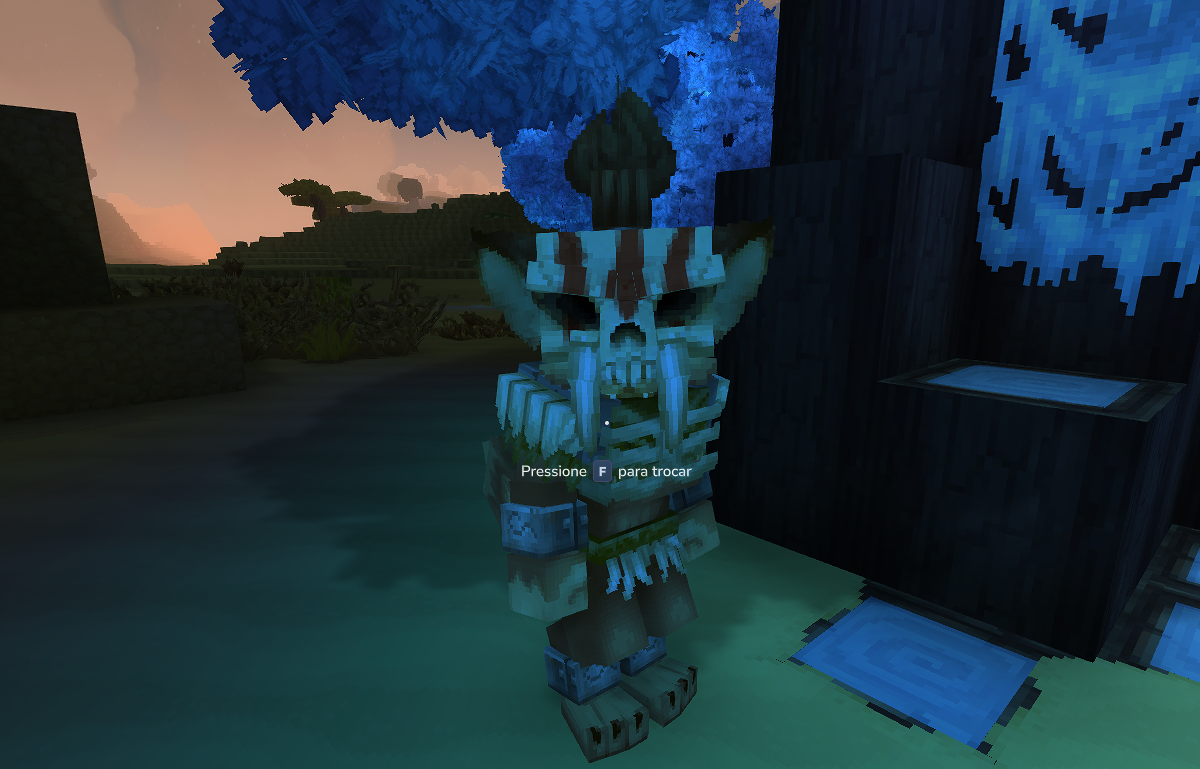
Haz clic derecho en el Feran para abrir la tienda de trueque
- Verifica:
- El título de la tienda muestra “Enchanted Merchant”
- El intercambio muestra: 3 Enchanted Fruit → 1 Enchanted Sapling
- Puedes completar el intercambio 5 veces (Stock: 5)
- Después de comprar las 5, el espacio se muestra como agotado
Errores comunes y soluciones:
| Error | Causa | Solución |
|---|---|---|
Unknown barter shop | El valor de Shop en OpenBarterShop no coincide con el nombre del archivo | Asegúrate de que "Shop": "Feran_Enchanted_Merchant" coincida con Feran_Enchanted_Merchant.json |
| No aparece pista de comercio al pasar el cursor | InteractionInstruction falta o está malformado | Verifica que la acción SetInteractable con Hint esté presente |
| El NPC es hostil | Actitud o plantilla incorrecta | Asegúrate de que DefaultPlayerAttitude sea "Neutral" y Type sea "Generic" |
| El intercambio muestra objetos incorrectos | Error en ItemId | Verifica que Plant_Fruit_Enchanted y Plant_Sapling_Enchanted coincidan con los nombres reales de los archivos de objetos |
| La tienda nunca se reabastece | RefreshInterval falta | Agrega "RefreshInterval": { "Days": 2 } a la definición de la tienda |
Referencia de Tiendas de Trueque Vanilla
| Archivo Vanilla | Patrón | Intercambios |
|---|---|---|
Kweebec_Merchant.json | 3 Fijos + 2 grupos Pool | Especias, Sal, Masa (fijos) + comida y recetas (rotativos) |
Klops_Merchant.json | 1 Fijo | Un solo intercambio de letrero de construcción |
Próximos Pasos
- Generación Personalizada de NPCs — coloca tu mercader en ubicaciones específicas del mundo
- Crear un Banco de Crafteo — permite a los jugadores fabricar objetos para comerciar con el mercader
- Referencia de Tablas de Botín — configura qué objetos se sueltan como material de comercio